
Wildsino Casino Mobile App - Play on the go
You're no longer tied to your desktop. With Wildsino's mobile platform, you have thousands of casino games, live betting and your entire account in your pocket, and to be honest, it works just as smoothly as the desktop version.
Overview of the Wildsino mobile app
The thing is: We don't have a separate app to download, and that's actually a good thing. Our mobile website runs directly through your browser (Chrome, Safari, whatever you use), which means you don't have to mess with app stores, wait for updates or waste space on your smartphone.
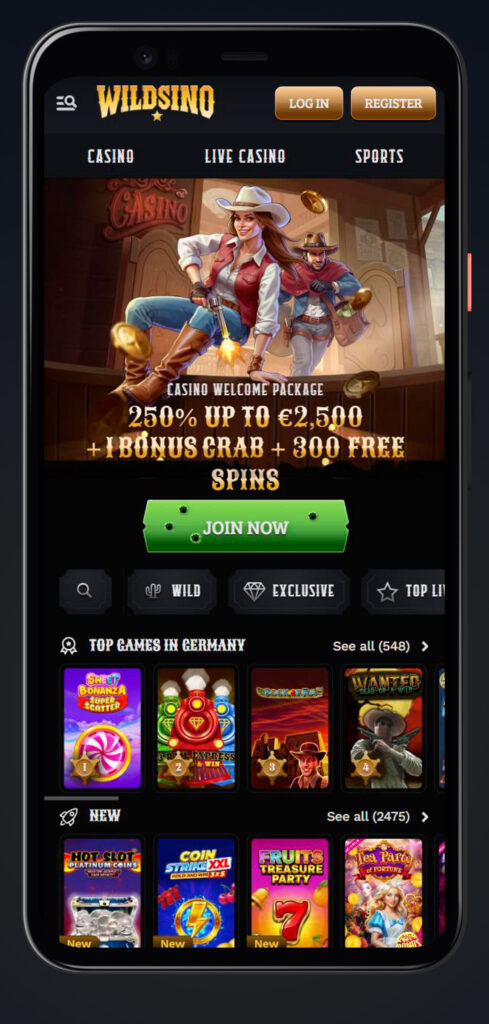
The mobile experience mirrors everything you get on a desktop. You'll find the same navigation bar with quick access to Casino, Live Casino, Jackpots, Sports, Live Betting, Virtual Sports, Challenges, Tournaments, Bonus Crab, Shop and VIP Levels. The user interface adapts perfectly to smaller screens without sacrificing functionality.
A big plus: you can create a shortcut on the home screen so that Wildsino feels and behaves like a native app. With one tap, the website is launched immediately without you having to enter the URL in the browser.
Installation of the mobile link
Want an app-like experience? Creating a shortcut takes about 30 seconds and gives you instant access directly from your home screen. The process differs slightly between Android and iOS, so we've broken it down for you.
Creating a shortcut on Android
Installing Wildsino on your Android home screen is very easy:
- Try the automatic installation first - visit wildsino.com and look for an installation prompt. Some browsers offer this automatically.
- If this does not work, tap on the menu symbol (three dots) in the top right-hand corner of your browser.
- Scroll through the menu options until you find „Add to home screen”.
- Tap on it and enter a name for the shortcut (or keep „Wildsino”).
- Confirm and the browser will add the icon to your home screen.
That's it. Now you have access to the entire casino at the tap of a finger.
Create shortcut on iOS
iPhone and iPad users proceed slightly differently:
- Open wildsino.com in Safari (this works best in Safari, not Chrome).
- Tap the share icon - this is the arrow pointing upwards from a box and is normally located at the bottom of your screen.
- Scroll down in the Share menu until you see „Add to home screen”.
- Tap on it and customise the name as you wish.
- Tap „Add” in the top right-hand corner.
The Wildsino icon will now appear next to your other apps on your home screen. Launch the app at any time for instant access.
Mobile functions and navigation Wildsino app
Let's take a look at what you actually get when you play on mobile. Spoiler: It's all from the desktop version, just optimised for touch controls.
The main navigation is located in a fold-out sidebar that can be hidden with a tap of the finger. From there, you can switch between Casino, Live Casino, Sports and all other sections without having to reload the pages. Your balance, coin count and profile access remain visible in the header, so you are always just a tap away from deposits or account settings.
| Function | Mobile access |
| Games library | Complete access to over 12,677 games |
| Live Casino | All over 760 live dealer tables |
| Sports betting | Pre-match and live betting on all sports |
| Deposits/withdrawals | Complete management of all payments |
| Bonuses | Claim and track all actions |
| Account settings | Complete profile and preference control |
| Support | Live chat and help centre |
Casino games on mobile devices
Every single casino game we offer runs on mobile devices - that's over 12,677 titles from 88 providers. You'll find the same categories as on desktop: Top, New, Popular, Halloween Themes, Wild Themes, Exclusive Games, Live Games, Table Games, Slots and the complete „All Games“ collection.
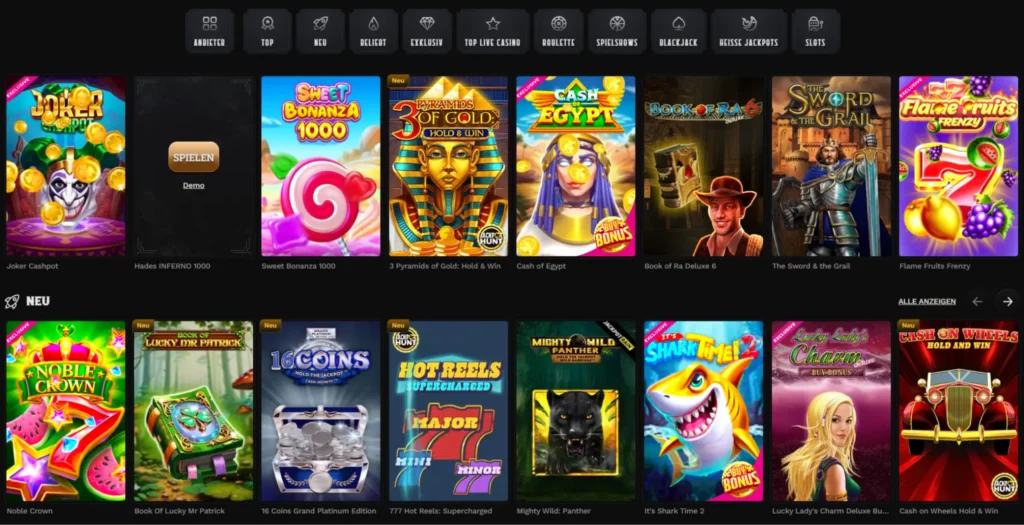
The search function works excellently on mobile devices. Tap on the search icon in the header, enter a game name or provider and the results will be displayed immediately. You can also filter by category or browse the providers' collections.
Popular titles run smoothly on mobile devices:
- Book of Dead and other adventures by Rich Wilde
- Sweet Bonanza series (including the 1000 variant)
- Gates of Olympus 1000
- Big Bass Collection
- All Pragmatic Play slots
- Evolution Gaming live games
- Exclusive Wildsino titles such as Witches Book and Cash of Egypt
The games load quickly, even on 4G connections. The touch controls are intuitive - swipe to spin slots, tap to place chips on roulette tables and zoom with two fingers to zoom in on live dealer streams.
Sports betting on mobile devices
Our sportsbook offers the complete pre-match and live betting experience on mobile devices. The user interface adapts to smaller screens with collapsible betting slips, easy odds navigation and quick market switching.
You can bet on all major sports:
- Football (Premier League, La Liga, Serie A, Bundesliga, Champions League)
- Basketball (NBA, Euroleague)
- Tennis (ATP, WTA)
- Ice Hockey (NHL)
- American Football (NFL)
- Also table tennis, volleyball, handball, e-sports and more
Live betting works particularly well on mobile devices. The odds are updated immediately in real time and you can place bets during the match just as quickly as on the desktop. The live match tracker shows the progress of the game without you having to leave the betting screen.
Conclusion: If you can bet on it from your desktop, you can also bet on it from your smartphone.
Account management on your mobile phone
Your complete account is right in your pocket. Tap the profile icon in the header to access everything.
Deposit and withdrawal options
- All payment methods available on the desktop also work on mobile phones
- Visa, Mastercard, Interac and other options, depending on your region
- Deposit limits, withdrawal requests and transaction history are all accessible
- The payment processing times remain the same as on the desktop
Profile settings
- Update your contact information (however, some details such as name and date of birth cannot be changed after registration)
- Set deposit and betting limits
- Configure notifications
- Manage tools for responsible gaming
Bonus management
- View active bonuses and the progress of wagering requirements
- Claim new promotions
- Check the bonus conditions
- Release completed bonuses
Coin credit & shop
- Track your coin balance (5 coins per deposit, 1 coin per €1 bet)
- Buy bonuses, free spins and free bets in the shop
- Redeem bonus crab trials
Everything loads quickly and forms are automatically filled in correctly on mobile keyboards. No frustrating problems with zooming or misaligned buttons.
Advantages of the Wildsino mobile platform
Why play on your mobile phone instead of your desktop? Here are the reasons why it's worth it:
Instant access from anywhere - no need to wait until you get home. Check the live betting odds during your commute, have a few rounds during your lunch break or play from the sofa while watching TV. Your account goes with you wherever you go.
No app store restrictions - Because it's a browser-based platform, you don't have to deal with app store approval processes, regional restrictions or delayed updates. We update features throughout the site, and you get them instantly without having to download anything.
Memory friendly - No installation required. Unlike native apps that can take up hundreds of megabytes of memory, our mobile website leaves your phone's memory untouched. Simply add a bookmark or create a shortcut.
Same game selection - you will not receive a slimmed-down „mobile version” with a limited game selection. All slots, live tables, sports markets and functions of the desktop version work identically on mobile devices.
Synchronised progress - Start a tournament on your desktop and check your position on your mobile device. Deposits made on your smartphone are immediately displayed on all devices. Your challenges, VIP progress and coin balance are synchronised in real time.
Controls optimised for touchscreens - The games are not simply scaled-down desktop versions. The developers optimise the slots and live casino interfaces for touchscreens so that the gameplay is smoother than having to click on tiny buttons on a scaled-down screen.
Truth be told, some players prefer mobile for certain games - live dealer titles feel more immersive on a handheld device, and quick spin slots are great to control with swipe gestures.
Help and support
Do you have a problem? Customer support works on mobile devices as well as on desktop computers.
Live chat
Tap the „Live chat” button in the footer or sidebar to get in touch with a support employee. The chat window is superimposed on your screen so that you don't lose track. Available around the clock.
Help
Use the links in the footer or the menu in the sidebar to access the full Help Centre. There you will find articles on the following topics:
- General questions about the account
- Deposits and withdrawals
- Technical troubleshooting
- Bonuses and promotions
- Payment methods
- Tools for responsible gaming
The help articles are displayed clearly on mobile devices with hideable sections and readable formatting. You can use the search function to find specific topics quickly.
E-mail support
Send detailed enquiries to support@wildsino.com. The response times are the same as for desktop support - usually within a few hours.
The language options and regional support work on mobile devices in the same way as on desktop computers. Change the language via the footer if required.

FAQ
No. Wildsino runs entirely via your mobile browser (Chrome, Safari, Firefox, etc.). Simply visit wildsino.com and play directly. You can create a shortcut on the home screen to access it like an app, but no separate download is required.
Yes, the entire game library - all 12,677+ casino games, 760+ live tables and the complete sportsbook - works on mobile devices. No game is available exclusively for desktop.
Tap on your balance in the header, select „Deposit”, choose your payment method and enter the amount. All payment options for desktop also work on mobile devices, including Visa, Mastercard and regional payment methods.
In any case. You can redeem bonuses, track wagering requirements and release completed actions directly from your mobile device. Bonus progress is instantly synchronised between desktop and mobile device.
Yes, the live chat and help centre work the same on mobile as on desktop. Tap „Live Chat” in the footer to get instant support or browse the help articles via the Help Centre link.
The use of gaming data remains similar regardless of the device. Slots and table games only consume minimal amounts of data. Live dealer streams consume more (similar to watching videos), usually 100 to 300 MB per hour, depending on the stream quality.
Yes, one account works on all devices. Log in on your smartphone, tablet or computer - everything is automatically synchronised, including balance, bonuses, VIP progress and game history.
Mobile connections use the same encryption as desktop devices. Your financial data, personal information and game history remain protected whether you are connected via Wi-Fi or mobile data. We recommend avoiding public Wi-Fi connections for deposits and withdrawals.